
Accred Automate

Rehearse every change. Then run it.
Accred Automate is workflow automation for IT teams and MSPs.
Free
Automate is open in Accred Hub and free for every Accred organization. Sign in to Hub and open it from the app list. Today you can build workflows from templates or plain words, read what each one would do, and set the approval rules your organization needs. Rehearsals, runs, undo, and the hourly client checks read and change Microsoft 365 tenants through Accred Manage, for your own organization and the customers you manage in Hub. Group membership changes run today; each other change runs once the tenant grants Manage the Microsoft permission it needs, and Explain lists those permissions for each workflow.
See it in the app. Every step has a screen.
Shown with sample data.
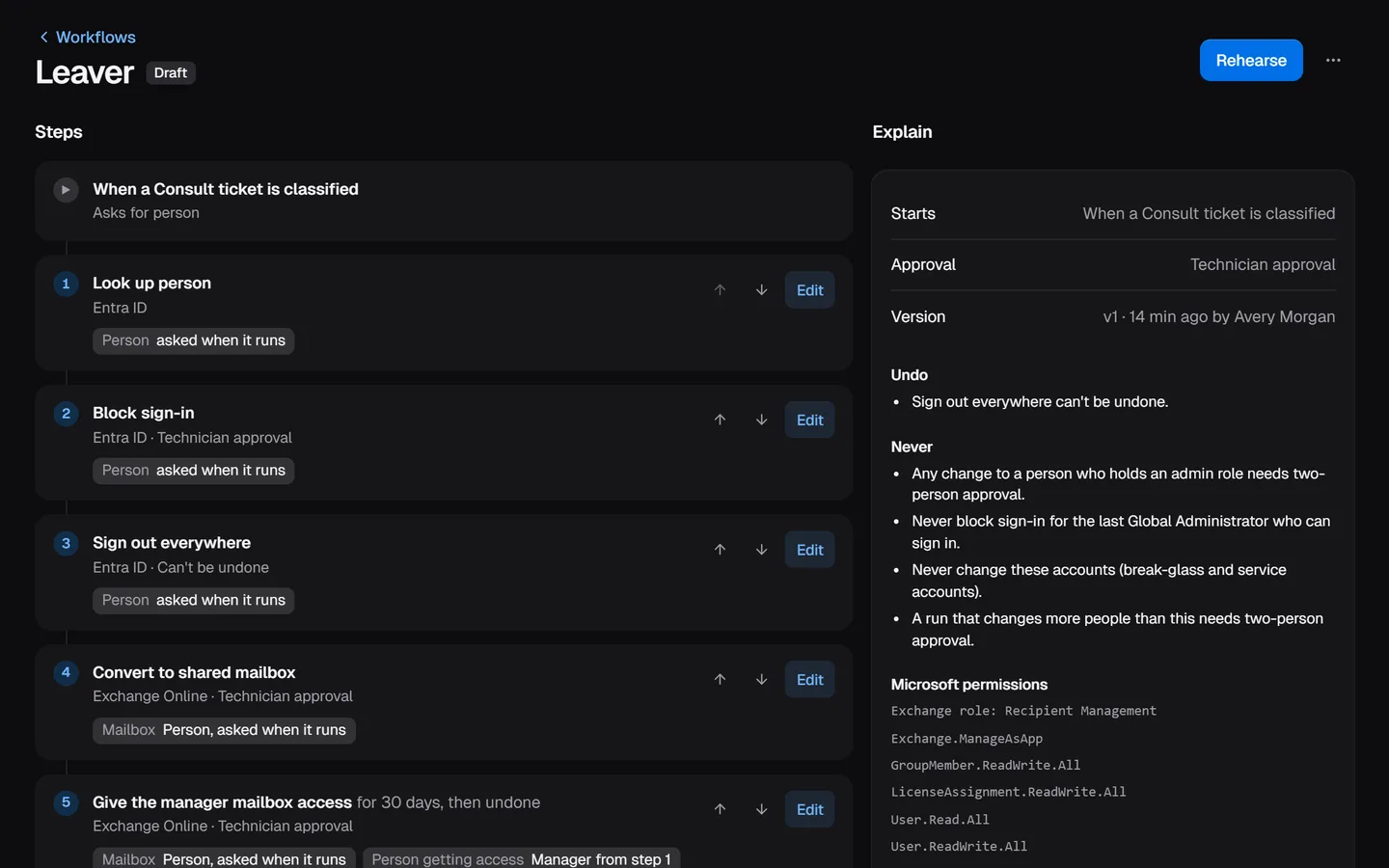
- What it can never do, in plain words
- The Microsoft permissions it needs
What Automate does today.
A visual builder: drag actions into place or use the keyboard, set inputs, approvals, and conditions, and fix what it flags before you save
Workflows built from 24 MSP templates, from leaver and new starter to lost phone, or drafted from plain words
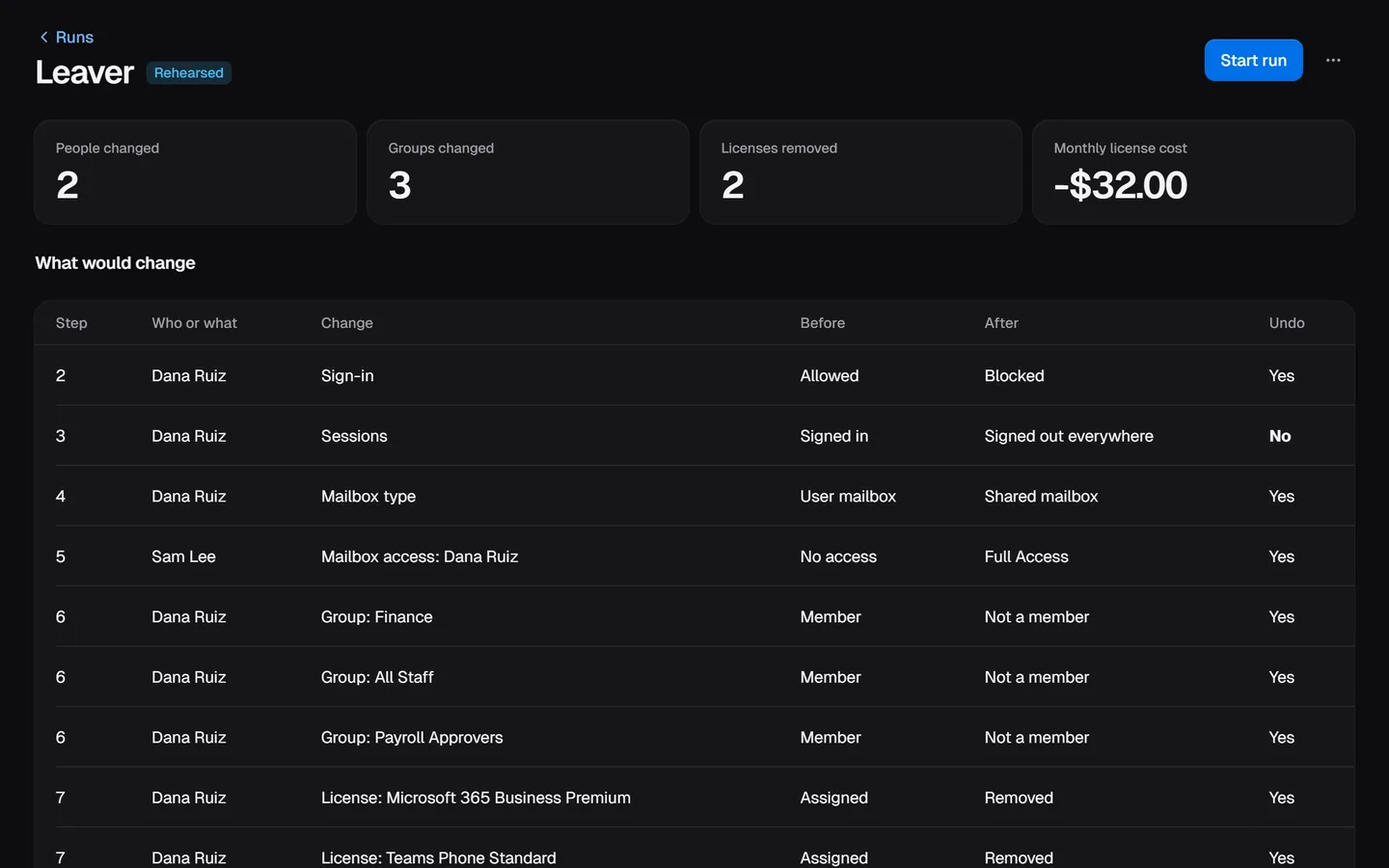
A rehearsal before every run: each change, who it touches, and the license cost, with nothing written
Approval rules per step and per organization, including two-person approval, and undo after a run
An audit log of every rehearsal, approval, run, and undo
Reads and changes Microsoft 365 tenants through Accred Manage, from group membership to licenses, mailboxes, and MFA resets
Rehearse, approve, run, undo
- Start from one of 24 templates for MSP work, type what should happen and let Automate draft the steps, or build it in the visual builder. Drafted steps are labelled as not checked until you review them.
- Rehearse the workflow for one client and one person. Automate reads the tenant, writes nothing, and lists every change: who or what, before and after, whether it can be undone, and the monthly license cost change.
- Start the run. It waits for the approval its steps need: none, a technician, or two people who did not ask for it. The approver approves that exact set of changes; if the tenant changed since, the run stops and asks for a new rehearsal.
- Undo the run later if you need to. Reversible changes go back in reverse order, and the run says which changes, such as signing someone out everywhere, cannot be undone.
The screen above is a rehearsal for a sample client. On a real tenant, the rehearsal reads that tenant through Accred Manage.
What works today
Open in Accred Hub today:
- The visual builder: drag actions from the palette into place, or add and reorder steps with the keyboard. Set the trigger, the inputs, where each value comes from, the approval each step needs, and conditions such as “only when the manager is set”. It flags missing values and steps that read a later step’s output before you can save, and each save is a new version you rehearse first.
- 24 templates, including leaver, new starter, lost phone, suspected compromise, and external mail forwarding.
- Explain: what starts a workflow, the approval it needs, what can and cannot be undone, and the Microsoft permissions its steps need.
- Rules your organization sets: two-person approval for changes to admins, never removing the last Global Administrator, protected accounts, and a limit on how many people one run can change.
- Roles from Hub: Viewers read; Members rehearse and run published workflows; Managers build and approve; Admins and Owners also set the rules and read the audit log.
- An append-only audit log.
Through Accred Manage, on your own Microsoft 365 tenant and on each customer’s that Manage connects: rehearsals that read the tenant, runs that add people to groups and remove them, undo, hourly checks that each client is still in the state you expect, schedules, and rollouts across many clients in rings.
Each other Microsoft 365 change runs once the tenant grants Accred Manage the Microsoft permission it needs: blocking sign-in, signing out everywhere, licenses, profile fields, automatic replies, shared mailboxes, mailbox access, aliases, forwarding, a Temporary Access Pass, an MFA reset, new and removed people, and device retirement. Explain names the permissions a workflow needs. Until a permission is granted, a rehearsal still shows the change, and a run stops at that step and says which permission is missing. Automate works with Microsoft 365 only.
How Automate keeps changes safe
Automate holds no Microsoft tokens or client secrets. Reads and changes go through Accred Manage, which already holds each tenant’s connection.
Every run is rehearsed first and approved against its exact changes. Your organization’s rules can raise the approval a run needs or block it, and a workflow refuses values that look like passwords or keys.
Questions about Automate
Is Accred Automate available?
Yes. Automate is open in Accred Hub and free for every Accred organization.
- Workflows rehearse and run on Microsoft 365 tenants through Accred Manage.
- Group membership changes run today; each other change runs once the tenant grants Manage the Microsoft permission it needs.
How much does Accred Automate cost?
Accred Automate is free in Accred Hub.
- There is no seat or per-run price.
Can Accred Automate undo a run?
Yes, for reversible changes: Automate undoes them in reverse order.
- Some changes cannot be undone, such as signing someone out of every session, and Automate marks those before the run starts.
Who approves a run?
Each step sets its approval: none, a technician, or two people.
- Your organization’s rules can raise it, for example to two people for any change to an admin.
- Nobody approves their own run.
Further reading
Every guide- Accred ManageAccred Manage: findings, access reviews, and verified changes in each client’s Microsoft 365 tenant, one client at a time with the client picker.
- Microsoft 365 software for MSPsWhich MSP jobs Accred covers today, from client delivery and migrations to tenant administration, backup, and licensing, and what is not there yet.
- Accred documentationQuick starts for Hub and all ten Accred apps: create your organization, then set up each app. Plus roles, seats, access, and help.
Automate is free.
$0for every Accred organization
Automate is free for every Accred organization, and so is Hub.